
(406)616-7519

Prewire Before Drywall: Smart Home Decisions to Make During New Construction

Building a custom home in Southwest Montana takes careful coordination. From framing and electrical to windows, lighting, and finishes, each phase builds on the one before it. Smart home technology deserves a place in those early conversations, especially before insulation and drywall go in.

The framing stage is one of the best opportunities to plan the technology that will make a home more comfortable, connected, and easier to manage. With the walls open, our team can run wiring for lighting control, motorized shades, speakers, security cameras, networking, and other integrated systems without working around finished surfaces.

Once drywall is installed, adding those connections becomes more complicated. Some changes may require opening finished walls or finding alternate installation routes. Planning ahead helps avoid unnecessary labor, added costs, and compromises in the final design.

At Smart Home Systems, we work alongside builders, architects, and interior designers early in the construction process to coordinate technology infrastructure before those decisions become harder to change.
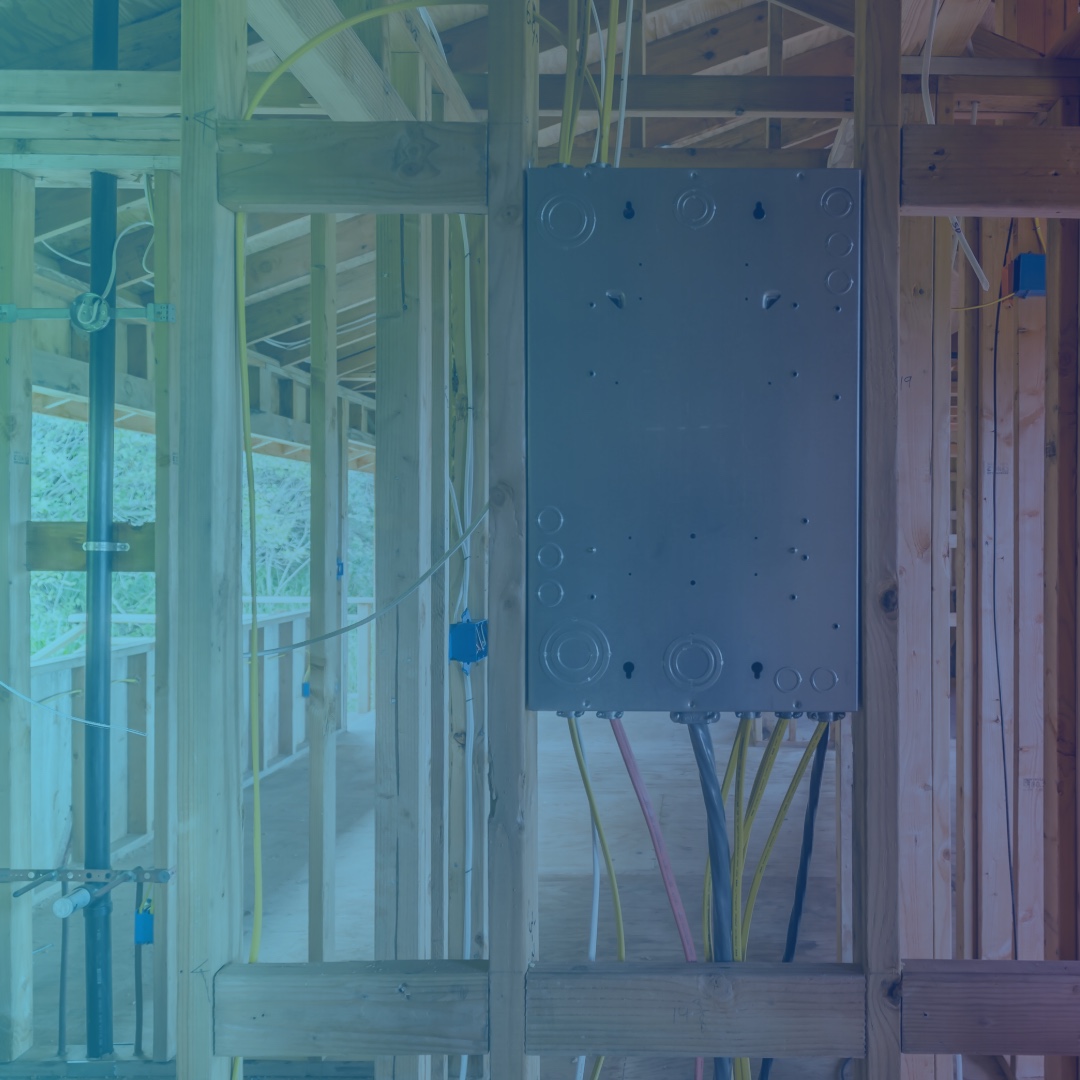
5 Smart Home Prewire Decisions to Make Before Drywall

A good prewire plan looks beyond the technology a homeowner wants today. It considers how the home will be used, where equipment will live, and what might be added in the future.

Here are five areas worth addressing while the framing is still exposed.

1. Choose a Location for the Equipment Rack

  • A centralized equipment rack brings important technology components together in one organized location. Networking equipment, control processors, audio distribution, and other system components may all need space here.
  • The location matters. Equipment requires adequate space, ventilation, power, and accessibility for future maintenance. It also needs to be positioned where wiring can reach the areas it serves without creating unnecessary complexity.
  • Builders and designers should identify this space early, rather than trying to fit equipment into whatever room or closet remains available near the end of construction.

2. Plan Motorized Shades Before Windows Are Finished

  • Motorized window shades can improve comfort, privacy, and light control throughout a home. They can also be integrated with lighting and other smart home controls.
  • For new construction, one important decision is whether certain windows should include recessed shade pockets. These pockets conceal the shade hardware for a cleaner finished appearance.
  • That decision affects framing, window details, electrical planning, and shade selection. Identifying the windows that will receive motorized shades before drywall helps ensure the necessary space and wiring are in place.

3. Plan Network Drops for the Entire Home

  • Reliable connectivity starts with infrastructure. Even homes with strong Wi-Fi benefit from properly planned wired network connections.
  • A prewire plan should consider more than the locations where computers and televisions will sit. Wireless access points, security cameras, smart home controllers, home offices, entertainment areas, and equipment locations may all need network connections.
  • Larger homes can require more network drops than homeowners initially expect. The right number and placement depend on the home’s size, layout, construction materials, technology plans, and how each space will be used.
  • Planning these connections during framing gives the network a stronger foundation and makes future expansion easier.

4. Run Wiring to Outbuildings While the Trench Is Open

  • Guest houses, detached garages, workshops, barns, and other outbuildings may eventually need network access, security cameras, lighting control, or entertainment systems.
  • If construction already includes trenching for utilities or other site work, it is worth discussing the possibility of running conduit for future technology connections.
  • The right pathway depends on the distance, site conditions, and intended equipment. Planning it before landscaping and site work are complete can help avoid reopening finished areas later.
  • Even if an outbuilding won’t receive technology right away, installing the appropriate infrastructure during construction can leave more options available down the road.

5. Coordinate Wiring for Lighting, Audio, and Security

  • Lighting control, distributed audio, and security systems all benefit from early planning.
  • Consider where keypads and lighting controls should go, which rooms need speakers, and where security cameras will provide useful coverage. Think about entry points, outdoor living spaces, garages, and other areas that may need additional connections.
  • These decisions should coordinate with the electrical plan, architectural details, and interior design. Speaker locations, for example, may affect ceiling layouts, while keypad placement should complement how people move through the home.
  • A coordinated prewire plan helps technology feel like a natural part of the home’s design rather than something added after construction

Why Builders and Architects Should Involve a Smart Home Integrator Early

Smart home infrastructure touches several parts of a construction project. Equipment locations affect space planning. Shade pockets affect window and ceiling details. Network connections and low-voltage wiring need to coordinate with electrical and framing work.

When the technology team joins the conversation early, these details can be addressed alongside the architectural and construction plans.

Smart Home Systems works with builders, architects, and interior designers throughout Southwest Montana to review plans and identify wiring, equipment, and control requirements before construction reaches the drywall stage.

Our goal is to make technology planning a coordinated part of the building process. That means fewer surprises during installation and a system designed around how the homeowner wants to live.

Building in Southwest Montana? Start Your Smart Home Plan Early.

From Bozeman and Big Sky to the Flathead Valley and Kalispell, new construction projects benefit from early technology planning.

Whether you’re building a primary residence, a vacation home, or a larger custom property, the prewire stage is an opportunity to prepare for the technology you want now and the possibilities you may consider later.

Smart Home Systems has been helping homeowners and building professionals plan and integrate residential technology since 2000. We work with your project team to coordinate the infrastructure, equipment space, and controls that support a well-designed smart home.

Planning a new build? Contact Smart Home Systems to schedule a plan review before drywall goes in.

Can Your Smart Home Be Hacked? Here’s How a Properly Designed Network Helps Protect It

A connected home gives you more control over your surroundings, from adjusting the lights and temperature to checking security cameras while you’re away. Behind all of that convenience is something homeowners don’t always think about: the network connecting it all.

As smart home technology becomes more integrated into everyday life, network security deserves just as much attention as the devices themselves. Any connected device can become a target for cyber threats, but a properly designed, segmented, and maintained network can reduce exposure and make it much harder for unauthorized users to access your home systems.

At Smart Home Systems, we believe a smart home should be designed with performance and protection in mind. That starts with the network.

Your Smart Home Is Only as Secure as the Network Behind It

Every connected device communicates through your home network. Security cameras, smart locks, lighting controls, thermostats, entertainment systems, and mobile devices all rely on that connection to function.

When these devices share a poorly configured network, a vulnerability in one device can potentially create an opening for others. For example, an outdated smart device with weak security could give an unauthorized user an opportunity to explore other parts of the network.

This doesn’t mean connected homes are inherently unsafe. It means network design matters.

A professionally planned network considers how devices communicate, which systems need access to one another, and how to limit unnecessary connections. These decisions help protect personal information, connected equipment, and the systems that make your home function.

Network Segmentation Creates Additional Layers of Protection

One of the most important tools in smart home network security is network segmentation.

In simple terms, segmentation separates devices into different areas of the network rather than allowing everything to communicate freely.

For example, a home network might separate:

  • Personal devices: Computers, smartphones, tablets, and other devices that access personal accounts and information.
  • Smart home devices: Lighting controls, thermostats, shades, and connected appliances.
  • Security equipment: Cameras, access controls, and other monitoring devices.
  • Guest access: A separate connection for visitors that keeps their devices away from private home systems.

This approach helps limit how far an unauthorized user could move if one device or network segment becomes compromised. It also gives the network designer greater control over which devices can communicate with one another.

The exact configuration depends on the home’s technology, equipment, and security requirements. The goal is to give every device the access it needs without exposing more of the network than necessary.

A Strong Firewall Helps Control Network Traffic

A firewall acts as a protective checkpoint between your home network and outside connections. It evaluates incoming and outgoing network traffic according to established security rules.

A properly configured firewall can help block unauthorized connections, restrict unnecessary access, and reduce exposure to suspicious network activity.

Firewall protection is particularly important in homes with multiple connected systems. As more devices communicate with cloud services, mobile applications, and one another, the network needs a clear set of rules governing that traffic.

A firewall is not a guarantee against every cyber threat, but it provides an important layer of defense when combined with other security practices.

Secure Wi-Fi and Device Management Reduce Common Vulnerabilities

Network security also depends on the everyday details of how devices are configured and maintained.

Some of the most useful practices include:

  • Strong, unique passwords: Avoid default device credentials and reuse of passwords across accounts.
  • Secure Wi-Fi encryption: Use current encryption standards supported by your router and connected equipment.
  • Multi-factor authentication: Enable it for accounts and services that support it, particularly those providing remote access.
  • Regular software updates: Keep routers, access points, smart home controllers, and connected devices updated with manufacturer security patches.
  • Guest network access: Give visitors a separate connection rather than sharing access to your primary home network.
  • Device reviews: Remove equipment you no longer use and review which devices have permission to connect.

These steps help reduce common points of vulnerability. They also make ongoing network maintenance an important part of owning a connected home.

Network Monitoring Helps Keep Your System Performing as Designed

Security doesn’t end when installation is complete. A home network changes as homeowners add devices, update equipment, and expand their automation systems.

Ongoing monitoring and technical support help identify connectivity problems, equipment issues, and changes that may affect network performance.

At Smart Home Systems, our approach to network design includes prioritizing network traffic so important activities can operate reliably. For example, streaming music or movies should not interrupt everyday internet use. Our team also provides system health monitoring and remote troubleshooting through SmartCare services.

It’s important to distinguish network health monitoring from dedicated cybersecurity threat monitoring. They serve different purposes, and homeowners should understand which services their network equipment and support plan include.

Regular reviews also provide an opportunity to confirm that software remains current, access permissions are appropriate, and new devices have been integrated correctly.

Smart Home Security Starts During the Design Process

The best time to address network security is before devices are installed and connected.

For new construction, that means considering network infrastructure during the planning process. Architects, builders, interior designers, and technology integrators can coordinate equipment locations, wiring, access points, and network requirements before walls are finished.

For existing homes, a network assessment can identify areas where equipment, configuration, or coverage may need attention.

Smart Home Systems designs high-performance home networks around the demands of connected living. Our team considers device requirements, network traffic, reliability, and the way homeowners use their technology.

We have been designing and integrating residential technology systems in Bozeman and Southwest Montana since 2000. That experience helps us plan networks that support today’s connected homes while allowing room for future upgrades.

A Smarter Home Needs a Thoughtful Security Plan

Can your smart home be hacked? Any connected device can present a potential security risk. No network design can promise complete protection from every threat.

However, network segmentation, firewall configuration, secure Wi-Fi, regular updates, and ongoing system support can make a meaningful difference in reducing exposure.

Whether you’re building a custom home in Big Sky, updating an existing property in Bozeman, or planning a connected home in the Flathead Valley, network security should be part of the conversation from the beginning.

Smart Home Systems designs and supports home networks that put performance, reliability, and security at the center of your connected home.

Schedule a consultation with our team to discuss your home’s networking and data security needs.